

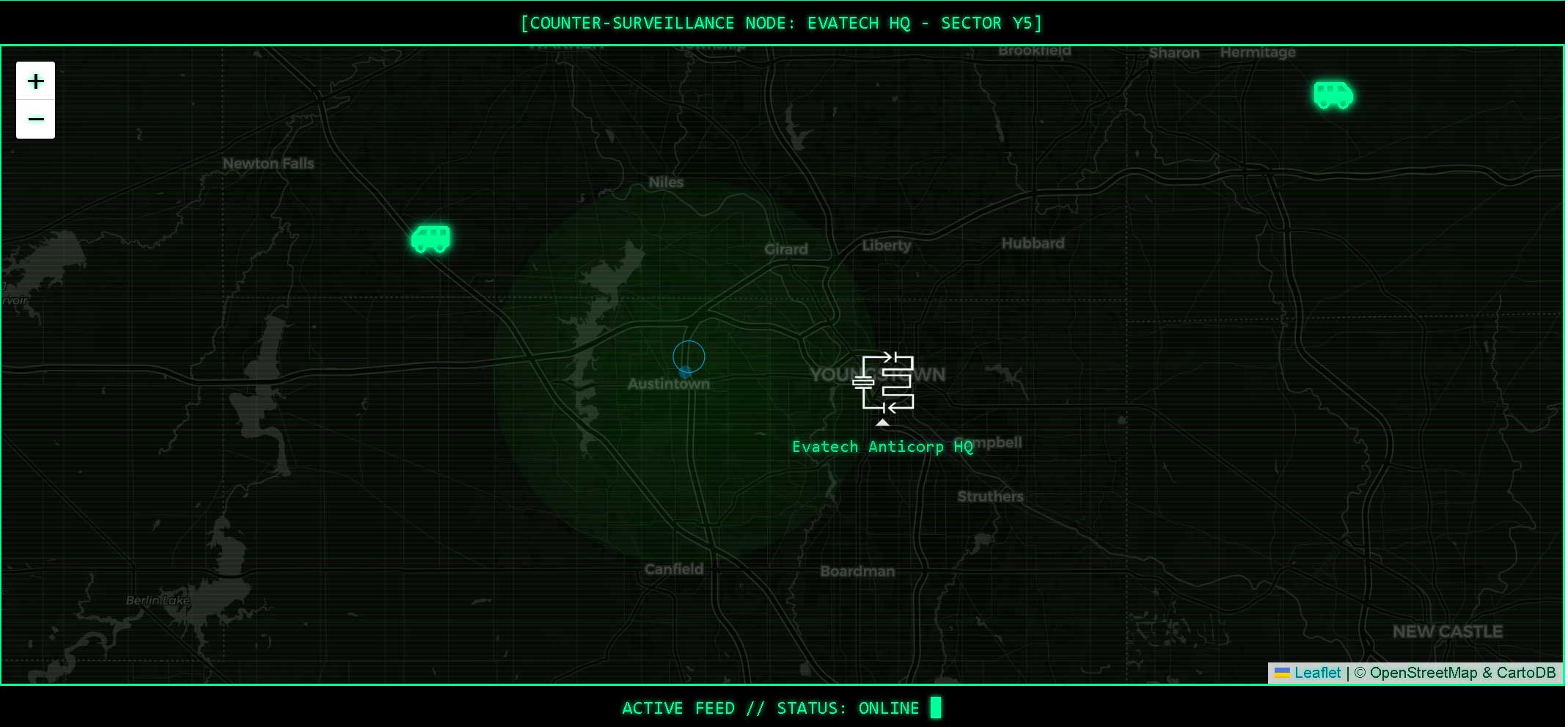
If you’re like me, you’ve probably spent more than a few hours obsessing over the look and feel of your projects. For Evatech — a company focused on PLC programming and industrial automation — I didn’t want just another boring contact page or corporate map embed. I wanted it to feel like the viewer had jacked into a surveillance terminal in an underground ops center circa 1987. And so began the mission to build a custom cyberpunk-themed interactive map.
The Vision
The goal was to create a dark, high-contrast map with glowing green visuals, animated icons, and a retro-futuristic aesthetic inspired by old BBS terminals, Cold War spy gear, and 80s action movie tech. The map would show our HQ in Youngstown, Ohio, and include animated service vehicles (styled as vans) driving away from the base, all layered with glitchy green scanlines and a cursor-controlled spotlight.
The Starting Point
We began with Leaflet.js — a lightweight, open-source JavaScript library for interactive maps. Leaflet gave us full control over the tiles, markers, and styling — exactly what we needed. I started with a basic map centered on Youngstown and a standard pin.
Styling the Map
The first challenge was getting the map tiles to match the aesthetic. We experimented with different tile sources and CSS filters. Inverting the colors and applying grayscale and contrast tweaks got us partway there, but some sources broke or resulted in 401 errors. After a lot of testing, we settled on CartoDB’s dark_all tile set, which gave us a solid black base to work from.
L.tileLayer('https://{s}.basemaps.cartocdn.com/dark_all/{z}/{x}/{y}{r}.png', {
  attribution: '© OpenStreetMap & CartoDB',
  subdomains: 'abcd',
  maxZoom: 19
}).addTo(map);
This gave us that solid black map base and avoided the filter stack issues we hit with inverted tiles from other providers.
Getting Custom Icons Right
Next came the marker for HQ. I used our own logo — the "EVAtar" — and turned it into a glowing icon. But it wasn’t as straightforward as I expected. Some attempts to style the icon directly broke the layout. Eventually, we wrapped it in a Leaflet divIcon with embedded HTML, allowing full control over glow effects and positioning.
const evatarIcon = L.icon({
  iconUrl: 'https://www.evatechusa.com/wp-content/uploads/2025/04/EVAtar_512_Red.png',
  iconSize: [48, 48],
  iconAnchor: [24, 24]
});
L.marker([41.0998, -80.6495], { icon: evatarIcon }).addTo(map);
The key was wrapping the image in a Leaflet icon object with precise anchor settings — that kept everything centered and glowing right.
The service vans were also a fun challenge. We replaced default markers with Font Awesome icons and animated their motion away from HQ. At first, they faced the wrong direction when they moved. To solve this, we flipped the icons horizontally based on direction, and we calculated their future heading before the animation started to avoid awkward visual flipping.
Glitch & Grid Effects
The biggest visual improvements came from layering scanlines and grid overlays. We used ::after pseudo-elements and repeating-linear-gradient backgrounds to create the classic CRT-style horizontal flicker and vertical grid. This gave the map that vintage ghost-in-the-machine vibe.
#scanlines {
  position: absolute;
  top: 0; left: 0;
  height: 100%; width: 100%;
  pointer-events: none;
  background-image: repeating-linear-gradient(
    to bottom,
    rgba(0, 255, 0, 0.06),
    rgba(0, 255, 0, 0.06) 1px,
    transparent 1px,
    transparent 4px
  );
  z-index: 999;
}

#grid-overlay {
  position: absolute;
  top: 0; left: 0;
  height: 100%; width: 100%;
  pointer-events: none;
  background-image:
    repeating-linear-gradient(to right, rgba(0,255,0,0.05) 1px, transparent 1px, transparent 50px),
    repeating-linear-gradient(to bottom, rgba(0,255,0,0.05) 1px, transparent 1px, transparent 50px);
  z-index: 998;
}
These gave it the retro CRT vibe — totally changed the feel of the whole interface.
We tried adding a flicker animation but ditched it when it didn’t have the visual impact we wanted. Instead, we shifted focus to a cursor spotlight effect — a radial green glow that follows the mouse. This required calculating cursor position relative to the map wrapper, not just the viewport, which we fixed by using getBoundingClientRect() to ensure it tracked correctly after scrolling.
document.addEventListener('mousemove', function (e) {
  const spotlight = document.getElementById('spotlight');
  const wrapper = document.getElementById('map-wrapper');
  const bounds = wrapper.getBoundingClientRect();

  const x = e.pageX - bounds.left - window.scrollX;
  const y = e.pageY - bounds.top - window.scrollY;

  spotlight.style.left = `${x}px`;
  spotlight.style.top = `${y}px`;
});
This fixed the offset spotlight issue and kept the cursor beam centered even after scrolling the page.
Final Touches
To tie it all together, we added terminal-style captions above and below the map: COUNTER-SURVEILLANCE NODE: EVATECH HQ - SECTOR 5C and ACTIVE FEED // STATUS: ONLINE █. These gave it that last bit of character and made it feel like part of a larger system — not just a widget.
Lessons Learned
- Start simple and build in layers — trying to do everything at once almost always broke something.
- CSS filters and blend modes are your friends — especially when you’re aiming for a non-standard look.
- Elementor compatibility matters — certain features and scripts can break if you don’t isolate your code.
- Debug incrementally — one small change at a time helped us pinpoint issues quickly.
What’s Next?
Now that the map is working as intended, I’m planning to expand this style to other areas of the site — maybe even a live node activity feed or a fake login console. We’ll see.
Hope this was helpful if you're building your own cyberpunk-styled UI. Or maybe it just gave you a little aesthetic inspiration. Either way, stay weird — and keep coding like it’s 1984.